Description of the settings - LSM Mobile
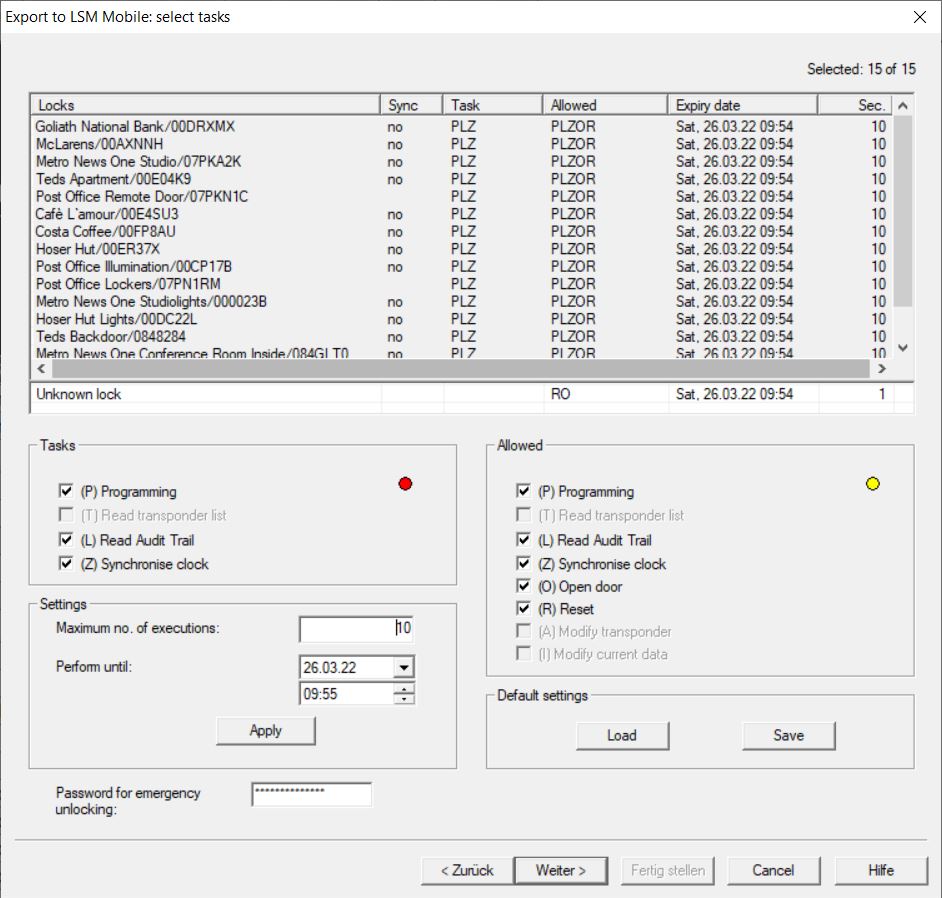
Tasks
The  (P) Programming, (L) Lead Audit Trail and (Z) Synchronise clock checkboxes are located in the Tasks section.
Tasks | Meaning |
|---|---|
| Locking component programming in LSM Mobile. |
| Reading the access list |
| Setting the locking system time and date. |
Settings
You can use the Tasks section to specify the maximum number of transactions and the point in time for the end of their validity.
- Enter the number of transactions.
- Select the date and time until when the tasks can be performed.
Allowed
The Allowed section defines which steps LSM Mobile may perform for this programming cycle.
Allowed | Meaning |
|---|---|
| Programming transactions may be carried out. |
| Access lists may be read and prepared for LSM. |
| Time and date may be set. |
| Door may be opened. |
| Locking device may be reset. |
Default settings
You can save the settings and load them again for the next export in the Settings sections.
Password for emergency opening
A newly defined password can be entered here which differs from the locking system password and can be transferred to the LSM Mobile user. It can now also carry out emergency openings if required. This is also subject to the restriction in the maximum number of transactions. The locking system password is not displayed to the programmer who uses LSM Mobile.