Executing tasks - SmartIntego OSS
Programming
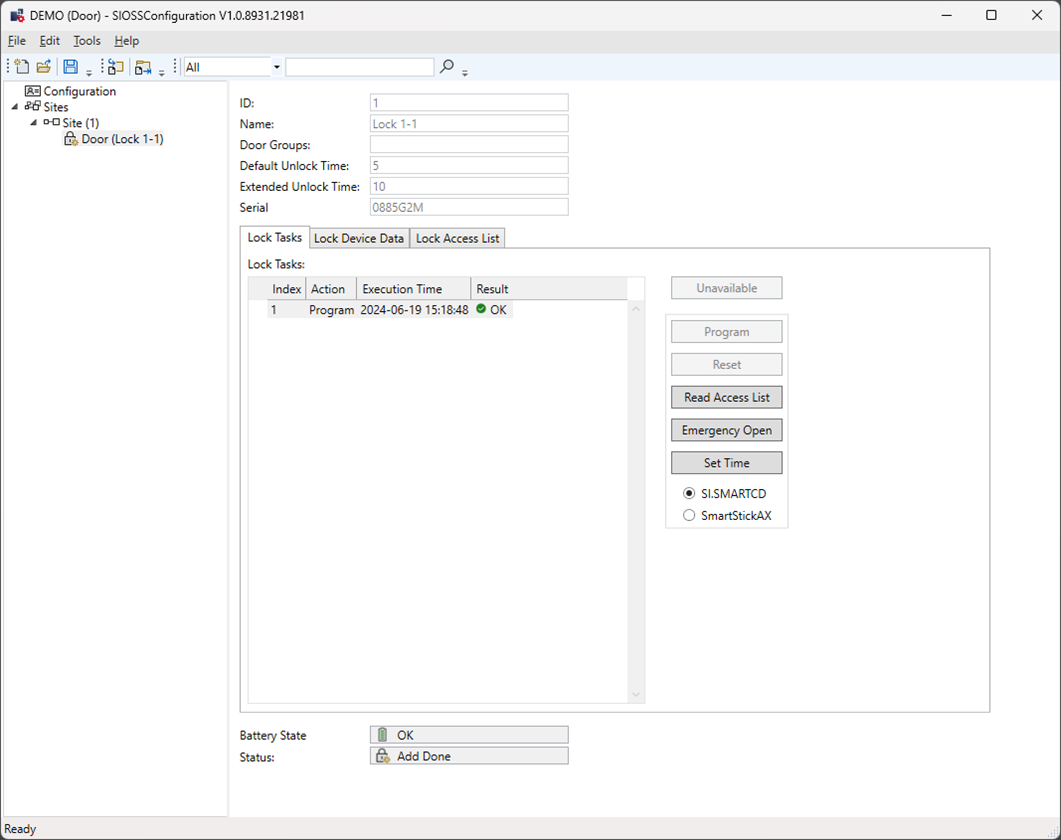
- Select the locking device in the navigation tree.
- Select the programming device (SI.SmartCD or SmartStickAX).
- Place the programming device on the locking device as required.
- Click on the “Program” button on the Sites page
Read out access list
- Select the locking device in the navigation tree.
- Select the programming device (SI.SmartCD or SmartStickAX).
- Place the programming device on the locking device as required.
- Click on the “Read Access List” button
Set time
- Select the locking device in the navigation tree.
- Select the programming device (SI.SmartCD or SmartStickAX).
- Place the programming device on the locking device as required.
- Click on the “Set Time” button
Open the door
- Select the locking device in the navigation tree.
- Select the programming device (SI.SmartCD or SmartStickAX).
- Place the programming device on the locking device as required.
- Click on the “Emergency Opening” button
- Enter the admin password if required.
Unavailable
OSS stipulates that the configuration tool must be process all export locking devices before the XML file can be exported. In practice, this proves to be impossible at times. The “Unavailable” button can be used for locking devices that are not accessed. This flags the locking device as unavailable.