Creating a project - SmartIntego OSS
- Launch the SIOSSConfiguration tool.
The first time the tool is launched, the box to create a new project will appear automatically.
If projects have already been set up on the system, a box will appear to open these projects.
- Click on File > New in the menu bar to create a new project manually.
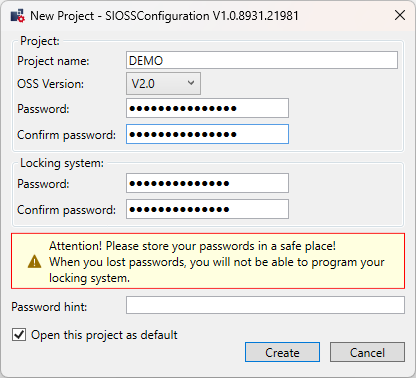
- Enter the following details into the box:
- Project name
- XML version
- Project password
- Locking system password
- Password hint
- Standard project checkbox
NOTE

Determining the XML version
Before creating, determine which XML version your host system supports. You cannot make changes during operation. All locking devices must be reset and transferred to a new project to change the XML version.
Basic adjustments
The following options are available in the Tools menu:
- General:
- Show dialogue for “Create project” or “Open project” on launching program
- Project:
- Change the working directory (location of the project file) if necessary
- XML version information
- Change project password if necessary
- Issue admin password
NOTE
Password security
Secure passwords should always be chosen. Passwords must also be treated confidentially and protected against loss.