Evaluating controller inputs - Smart.Surveil
The digital inputs on the SREL3 ADV system controller can be forwarded to LSM, where they may trigger actions.
Adding an event
If you wish to use LSM or SmartSurveil (see SmartSurveil) to evaluate an input, you first need to create the corresponding input as an event in LSM. Only then will changes to the input also be saved in the LSM database.
- LSM open.
- SREL3 ADV System added to the matrix.
- Use Network to select the item.
- The Network event manager window will open.
- Click on the New button.
- The New Event window will open.
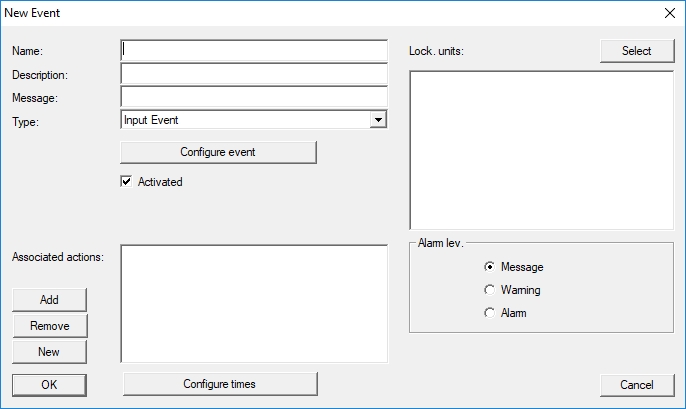
- Enter a suitable name for the event.
- Enter an optional description for the event.
- Enter an optional message.
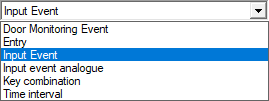
- Open the drop-down menu.
- Select the Input Event item.
- Click on the Configure event button.
- The Input Event window will open.
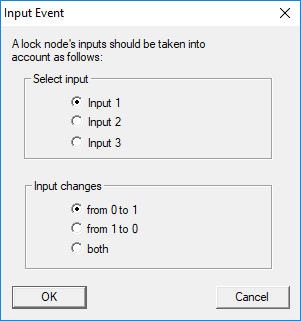
- Select the required input in the Select input section.
- Select the status change that the event should trigger in the Input changes section.
- Click on the OK button.
- Click on the Select button to assign a locking device to the event.
- The Administration window will open.
- Highlight one or more locking devices.
- Click on the ← Add button.
- Click on the OK button.
- Window closes.
- Locking device is assigned to the event.
- You can use the New or Add button to assign an action if you wish to configure an action.
- Click on the OK button.
- Window closes.
- Event is displayed in the Events section.
- Click on the Exit button.
- Window closes.
- Input is added as an event and triggers an action.