SmartSurveil - Smart.Surveil
SmartSurveil is a stand-alone software tool used to simplify the monitoring of door statuses. Events detected by network-capable devices are stored in the LSM database by these devices via the CommNode server. SmartSurveil continuously monitors the LSM database to detect changes and displays the current status of networked and monitored locks.
The controller of the SREL3 ADV system is a networked device and can also be monitored by SmartSurveil. There is one special feature: The controller is not a locking device and therefore cannot automatically detect the locking device status. Instead, the inputs at the digital inputs are evaluated and can be displayed in SmartSurveil as "open", "locked" or "closed". However, SmartSurveil must be set up for this:
- Events for inputs to be monitored have been set up in the LSM (see Evaluating controller inputs).
- SmartSurveil linked to database.
- User logged on to SmartSurveil.
- Controller of the SREL3 ADV system is shown.
- Switch to the Doors tab.
- Click on the button Settings.
- Window SmartSurveil: Settings opens.
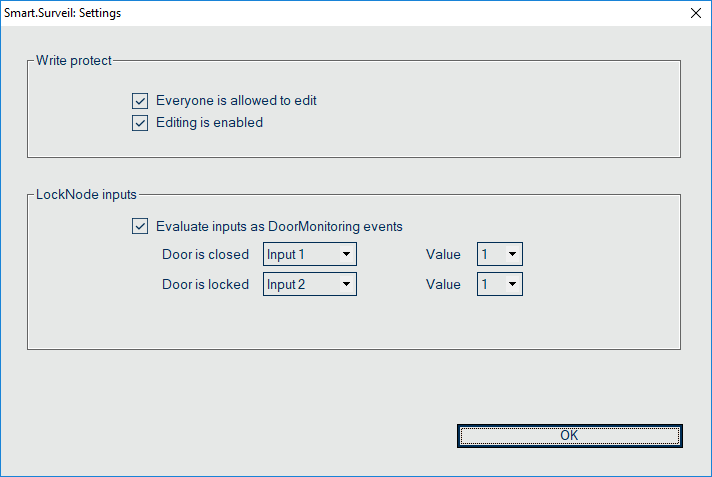
- Activate the option
 Evaluate inputs as DoorMonitoring events.
 - Open the drop-down menu .
- Select the input that monitors whether a door is closed.

- Open the drop-down menu.
- Select the state of the input to be detected as closed by SmartSurveil.

- Open the drop-down menu .
- Select the input that monitors whether a door is locked.

- Open the drop-down menu.
- Select the state of the input to be detected as "locked" by SmartSurveil.
- Click on the OK button.
- Window closes.
- SmartSurveil is configured to monitor the SREL3 ADV system.
NOTE

SmartSurveil will only detect a door as locked if it has previously been detected as closed.
NOTE
These settings apply to all SREL3 ADV systems in the linked LSM database.Select the input that monitors whether a door is closed.
For details on SmartSurveil, please refer to the SmartSurveil manual.