Installation and start - Smart.Surveil
Install SMART.SURVEIL by executing the installation file and following the instructions.
You need to take the following steps to connect to a locking system:
- A SimonsVoss locking system already exists with DoorMonitoring locking devices networked via WaveNet.
- LSM BASIC: The computer on which SMART.SURVEIL is run is also the computer on which LSM Basic (including network module) is installed.
- LSM BUSINESS: The computer on which SMART.SURVEIL is run has read access to the locking system's database.
- Launch the SMART.SURVEIL application.
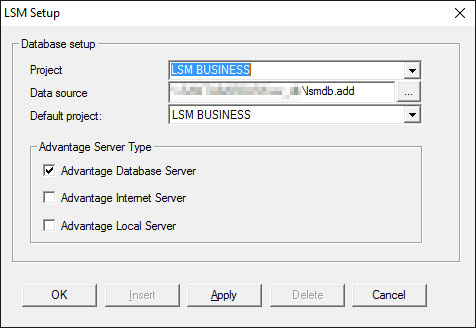
- Copy the project path to the required lsmdb.add- file e.g. [...\]sv_db\lsmdb.add. You will find this path under "Setup" in the "Data source" field on the LSM software registration screen. (LSM BUSINESS only)
- Enter an authorised user name, such as "Admin".
- Enter the corresponding user password.
- Use the "OK" button to log onto the locking system with SMART.SURVEIL.