DoorMonitoring SmartHandle - Smart.Surveil
In the LSM or in Smart.Surveil you can monitor your DoorMonitoring SmartHandles. To do this, however, you first have to configure the DoorMonitoring SmartHandles in LSM:
- LSM open.
- Matrix screen open
- Double-click on the DM-SmartHandle to open the settings.
- Change to tab Configuration/Data.
- Click on the button Monitoring configuration.
- The window Door Monitoring Configuration opens.
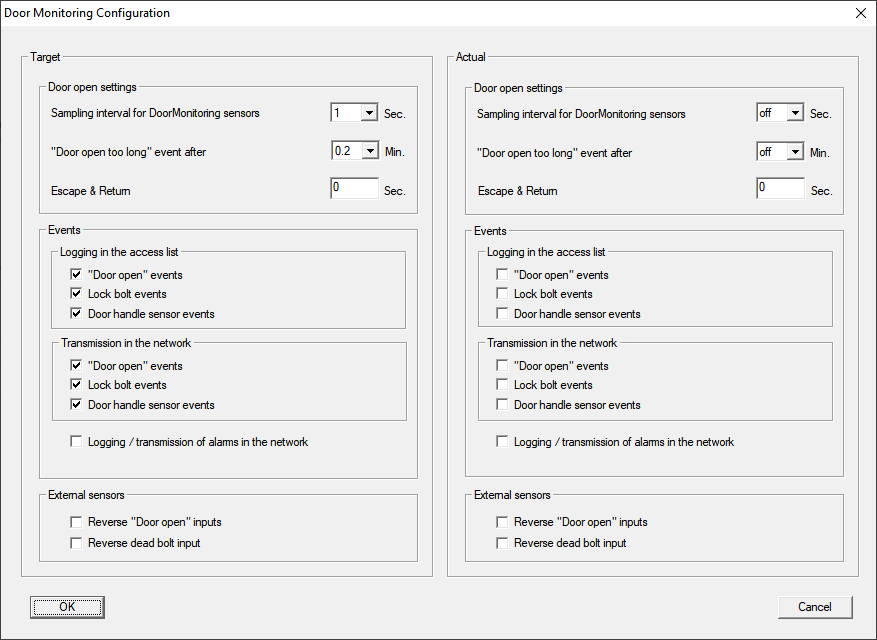
- Activate in the area Target-Events in the areas Logging in the access list and Transmission in the network the DoorMonitoring events that you would like to monitor (e.g.
 "Door open" events, Lock bolt events and Door handel sensor events).
 - If necessary, make further DoorMonitoring settings, e.g. in the area Door open settings.
- Click on the OK button.
- The window Door Monitoring Configuration closes.
- Click on the Apply button.
- Programme the SmartHandle.
- DoorMonitoring events are stored in the LSM database and can be evaluated by LSM and SmartSurveil.