Procedure - MobileKey Locking cylinder (Z4)
- Place the installation/battery key on the inside thumb-turn in such a way that the two teeth lock into the openings in the locking disc; if necessary, turn the thumb-turn until both teeth engage into the locking disc.
NOTE

The tool must be placed flat on the inside front surface of the recessed grip ring to ensure that the installation/battery key can engage into the locking disc.
- Hold the inside thumb-turn firmly and carefully turn the installation/battery key about 30° in a clockwise direction (until you hear a click).
- Remove installation/battery key from the thumb-turn.
- Push recessed grip ring backwards towards the door, so that it comes away from the thumb-turn.
- Hold recessed grip ring firmly and turn thumb-turn about 10° in an anti-clockwise direction and remove.
- For MH cylinders only: Carefully fold antenna upwards.
- Carefully remove both batteries from the holder.
- Insert the new batteries into the holder at the same time with the positive poles next to each other; change the batteries as quickly as possible. Use clean gloves free of fat or grease to handle new batteries.
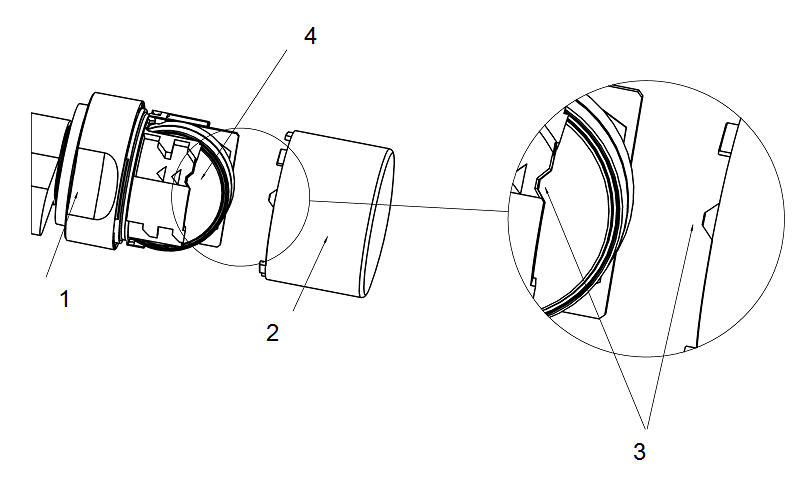
- For MH cylinders only: Lock antenna back into place.
- Replace the thumb-turn (align the triangle mark as in the diagram), hold the recessed grip ring firmly and fasten the inside thumb-turn by turning in a clockwise direction (about 10°). (Diagram may differ slightly from the purchased product)
- Push recessed grip ring back onto the thumb-turn, so that the thumb-turn and ring close together in a flush fit.
- Place the installation/battery key on the inside thumb-turn in such a way that the two teeth lock into the openings in the locking disc; if necessary, turn the thumb-turn until both teeth engage into the locking disc.
- Close the thumb-turn again by turning it about 30° in a clockwise direction (until you hear a click).
Then activate an authorised ID medium and check that it functions.