Getting started - Programming device SmartCD2.G2
Operated via a USB port
SmartCD2.G2 can be directly connected to a PC or laptop by plugging the supplied cable into an unassigned USB port.
All digital locking devices and all active transponder media in SimonsVoss System 3060 can be programmed using a SmartCD2.G2 in conjunction with a PC/laptop.
- AXM/LSM software is installed (drivers are also installed).
- SmartCD2.G2 is charged (see Recharging).
- Unplug the USB cable from the SmartCD2.G2.
- Press the button once if the top LED lights up continuously.
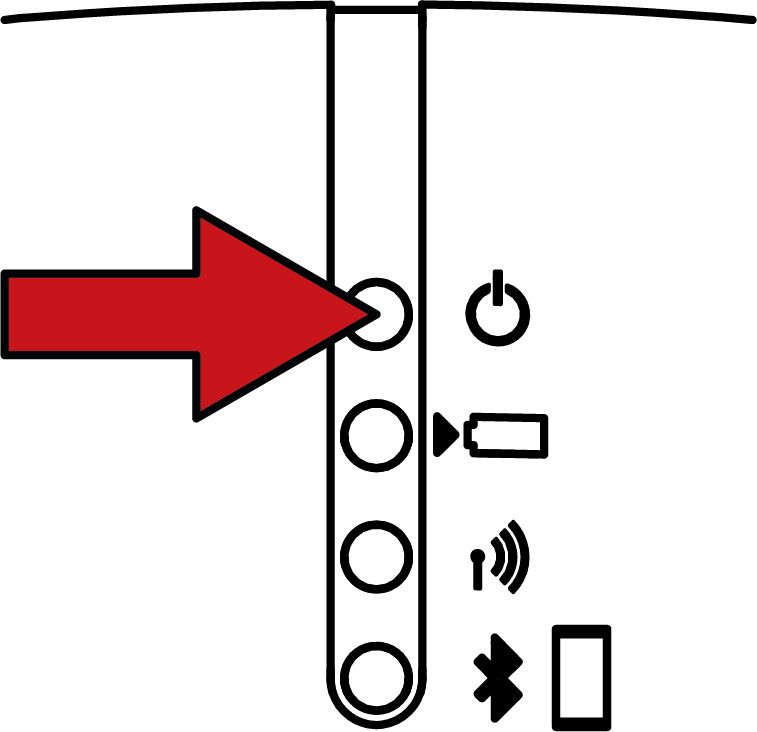
- Top LED flashes and does not light up continuously.
- Plug the USB cable into the SmartCD2.G2 again.
- The programming device is ready for use.
Operating via Bluetooth interface
NOTE

USB cable and Bluetooth connection cannot be used at the same time
A plugged-in USB cable may deactivate the Bluetooth interface, depending on the firmware version (<9.10.4.47).
- Unplug the USB cable to operate via Bluetooth.
- SmartCD2.G2 is charged (see Recharging).
- Unplug the USB cable from the SmartCD2.G2.
- Press the button once when the top LED flashes.
- The top LED lights up continuously and does not flash.
- The programming device is ready for use.
The SmartCD2.G2 switches automatically from Bluetooth mode to standby mode to save power if you press the button or if it is inactive for about 15 minutes.